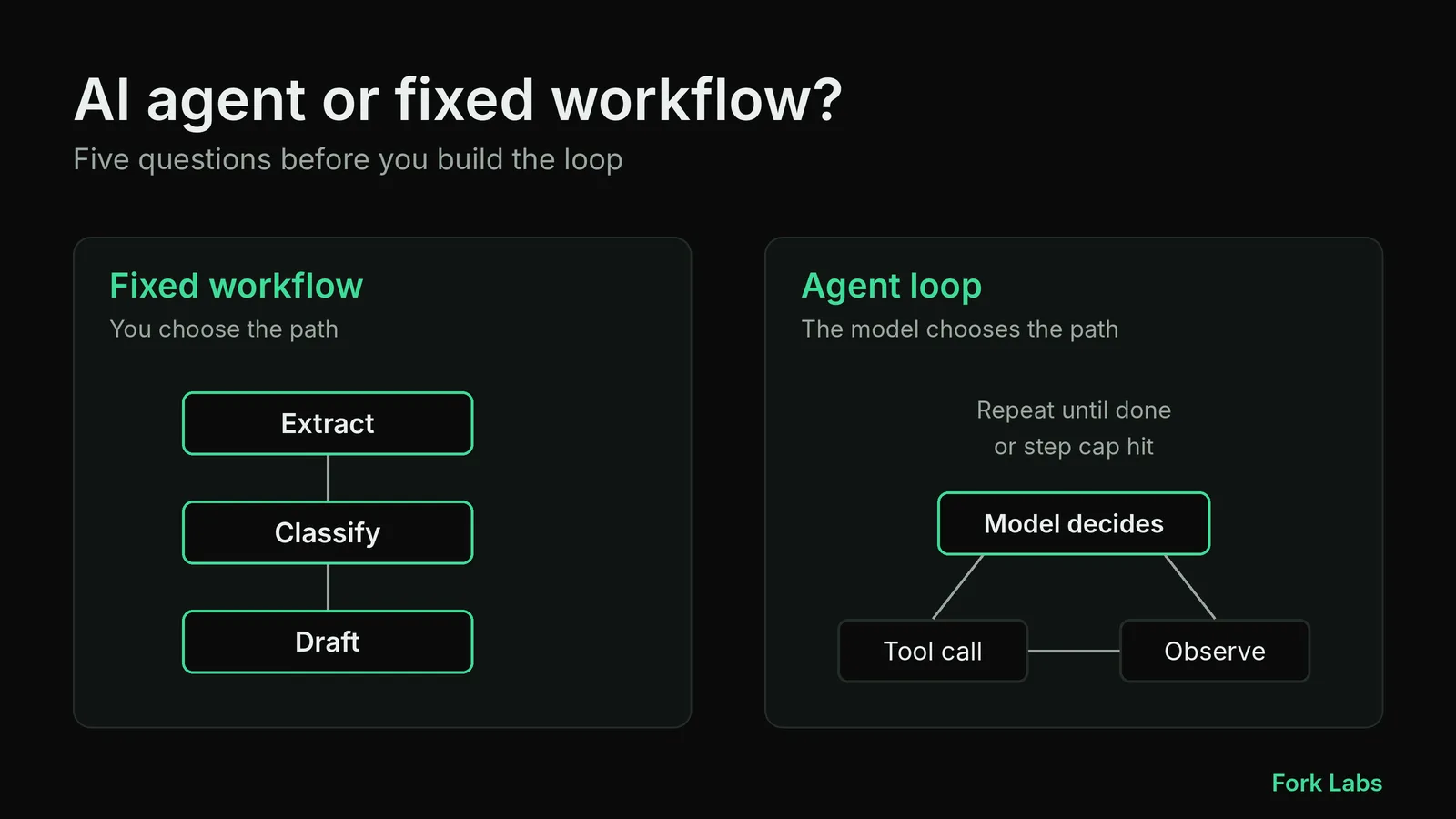
Teams often ask us for "an agent" when what they need is a pipeline with one or two LLM calls in it. The difference matters. An agent decides its own next step at run time. A workflow runs steps you wrote in advance. The first is more flexible, the second is cheaper, easier to test and far easier to debug at 2 a.m.
This post is the framework we use to decide, before any code is written. It is analysis from our own practice, not a benchmark, and the numbers in the examples are illustrative.
The core difference
A workflow is code you control: step 1 extracts, step 2 classifies, step 3 writes a draft. The model fills in fields, but the path is fixed. An agent is a loop: the model looks at the state, picks a tool, observes the result and repeats until it decides it is done.
That loop is where the cost and the risk come from:
- The number of model calls is not known in advance, so the bill and the latency vary per request.
- The set of possible paths grows quickly with every tool you add, so you cannot test them all.
- A wrong early decision is carried forward into every later step.
None of this makes agents bad. It means you should buy that flexibility only when the task needs it.
Five questions to ask first
1. Can you write the steps down?
If a competent person can write the procedure as a numbered list that rarely changes, you have a workflow. Invoice extraction, ticket triage, document summarisation and "answer from our docs" are all of this shape. If the honest answer is "it depends on what we find", you may need an agent.
2. How costly is a wrong action?
Agents that only read (search, retrieve, summarise) fail softly. Agents that write (send emails, update records, run queries, spend money) fail expensively. For write actions we default to a workflow with a human approval step, and only give the model a tool that can act once it has earned it in testing.
3. Does the number of steps vary a lot?
Research, debugging and multi-source investigations genuinely vary: sometimes two lookups, sometimes twelve. A fixed pipeline either wastes effort or stops too early. When variance is high and the value per task is high, a loop earns its cost.
4. Can you define "done" and check it?
An agent needs a stopping rule you can verify: tests pass, a record exists, a schema validates. If success is only "looks good to a human", the loop will either stop too early or run until a hard step limit.
5. Can you afford the unpredictability?
Set a rough budget: maximum model calls, maximum seconds, maximum spend per task. If you cannot state those limits, you cannot safely run a loop in production.
A quick scoring table
| Signal | Points toward workflow | Points toward agent |
|---|---|---|
| Steps | Known, stable | Depend on intermediate findings |
| Action risk | Writes, payments, external messages | Read-only |
| Step count | Roughly constant | Highly variable |
| Success check | Schema, test or rule | Hard to automate |
| Volume | High, cost-sensitive | Low volume, high value per task |
Three or more signals in one column is usually enough to decide. Mixed results mean the hybrid below.
The hybrid that usually wins
Most production systems we would build sit in the middle: a workflow skeleton with one bounded agent step where flexibility is truly needed. For example, a support pipeline classifies the ticket and extracts fields with fixed steps, then lets a small agent search the knowledge base and order history (read-only tools) to prepare a draft, and finally hands the draft to a person.
def handle_ticket(ticket):
    fields = extract_fields(ticket)          # fixed step, schema-validated
    category = classify(fields)              # fixed step, small model
    if category == "needs_investigation":
        draft = investigate(                 # bounded agent loop
            fields,
            tools=[search_kb, lookup_order],  # read-only tools only
            max_steps=6,
            max_seconds=45,
        )
    else:
        draft = template_reply(category, fields)
    return queue_for_review(draft)           # human approves anything that acts
The agent is boxed in by read-only tools, a step cap, a time cap and a review queue. If it misbehaves, the blast radius is a bad draft, not a bad action.
Testing and operating the agent step
Whichever side you land on, build the evaluation set first. Collect 30 to 50 real, anonymised inputs with the answer a good human would give, and re-run them on every prompt, model or tool change. For agent steps, also log every tool call and its result, so you can replay a bad run and see the exact decision that went wrong.
Three habits have saved us time:
- Hard limits in code, not in the prompt. Step caps and timeouts are enforced by the runner; the prompt only suggests them.
- Narrow, well-described tools. Five precise tools beat fifteen overlapping ones. When we built a Prompt Registry MCP server to standardise LLM use across enterprise teams in earlier work, the clearest gains came from tight tool definitions and shared, versioned prompts rather than from a smarter model.
- Deterministic fallbacks. If the loop hits its cap, return what it found and route to a person instead of retrying indefinitely.
Takeaway
Start with a workflow. Add an agent loop to a single step only when you can name the variability that justifies it, and wrap it in read-only tools, hard limits and a review step. If you cannot write the stop condition and the budget on one line each, you are not ready to ship the loop. When you do need one, the same questions tell you how to scope it.